A VSCode extension for running Killercoda {{exec}} blocks straight from Markdown.
Killercoda scenarios mark runnable commands by following a fenced code block's
closing fence with a {{exec}} directive. This extension detects those
blocks in any Markdown file and floats a ▶ Run in terminal action
(a CodeLens) above each one — sending the command to the active terminal (creating a
Killercoda terminal if none exists). A ⧉ Copy action sits
next to it.
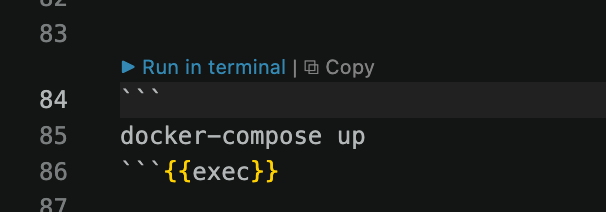
{{exec}} and {{exec interrupt}} block.{{exec interrupt}} blocks send Ctrl-C before running.killercodaExec.enableCodeLens and killercodaExec.showCopyAction settings.Then install it one of two ways:
From the command line:
code --install-extension killercoda-exec-latest.vsixFrom the VSCode UI: open the Extensions view (Cmd/Ctrl+Shift+X) → ⋯ menu → Install from VSIX… → pick the downloaded file. Reload when prompted.
Open any Markdown file containing {{exec}} blocks and the
▶ Run in terminal actions appear automatically.